DRIBL GUIDE
DRIBL GUIDE
HOW TO FIND YOUR TEAM FIXTURES IN DRIBL
HOW TO FIND YOUR TEAM FIXTURES IN DRIBL
DRIBL is the competition management system used by Capital Football to publish and manage match fixtures, results and competition information.
DRIBL is the competition management system used by Capital Football to publish and manage match fixtures, results and competition information.
Parents and players can use DRIBL to check when and where their Monaro Panthers team is playing.
Parents and players can use DRIBL to check when and where their Monaro Panthers team is playing.
RECOMMENDED
RECOMMENDED
FOLLOW YOUR TEAM
FOLLOW YOUR TEAM
The easiest way to keep track of your fixtures is to follow your team in DRIBL. Once followed, it is much easier to return to upcoming matches throughout the season.
The easiest way to keep track of your fixtures is to follow your team in DRIBL. Once followed, it is much easier to return to upcoming matches throughout the season.
01
OPEN DRIBL
OPEN DRIBL
Open the DRIBL app on your phone. Log in or sign up to continue.
Open the DRIBL app on your phone. Log in or sign up to continue.
02
FIND YOUR TEAM
FIND YOUR TEAM
Use the competition filters in DRIBL in the following order, then select the correct team for your age group and division.
Use the competition filters in DRIBL in the following order, then select the correct team for your age group and division.
COMPETITION PROVIDER → CAPITAL FOOTBALL
COMPETITION PROVIDER → CAPITAL FOOTBALL
COMPETITION → (eg. MINIROOS)
COMPETITION → (eg. MINIROOS)
CLUB → MONARO PANTHERS FC
CLUB → MONARO PANTHERS FC
TEAM → SELECT THE CORRECT AGE GROUP / DIVISION
TEAM → SELECT THE CORRECT AGE GROUP / DIVISION
03
FOLLOW THE TEAM
FOLLOW THE TEAM
Open the team’s page and select Follow. The team will then be visible under Following, and its fixtures will populate in the DRIBL calendar without needing to search every week.
Open the team’s page and select Follow. The team will then be visible under Following, and its fixtures will populate in the DRIBL calendar without needing to search every week.
FOLLOW YOUR TEAM — IN THE APP
FOLLOW YOUR TEAM — IN THE APP

STEP 01
STEP 01
Select Capital Football
Choose Capital Football as the competition provider.
Choose Capital Football as the competition provider.

STEP 02
STEP 02
Select the competition
Choose the relevant league or MiniRoos competition.
Choose the relevant league or MiniRoos competition.

STEP 03
STEP 03
Select Monaro Panthers FC
Find and select Monaro Panthers FC from the club list.
Find and select Monaro Panthers FC from the club list.

STEP 04
STEP 04
Follow your team
Choose the correct age group and division, then tap Follow.
Choose the correct age group and division, then tap Follow.
FINDING YOUR FIXTURES
FINDING YOUR FIXTURES
VIEW YOUR TEAM’S MATCHES
VIEW YOUR TEAM’S MATCHES
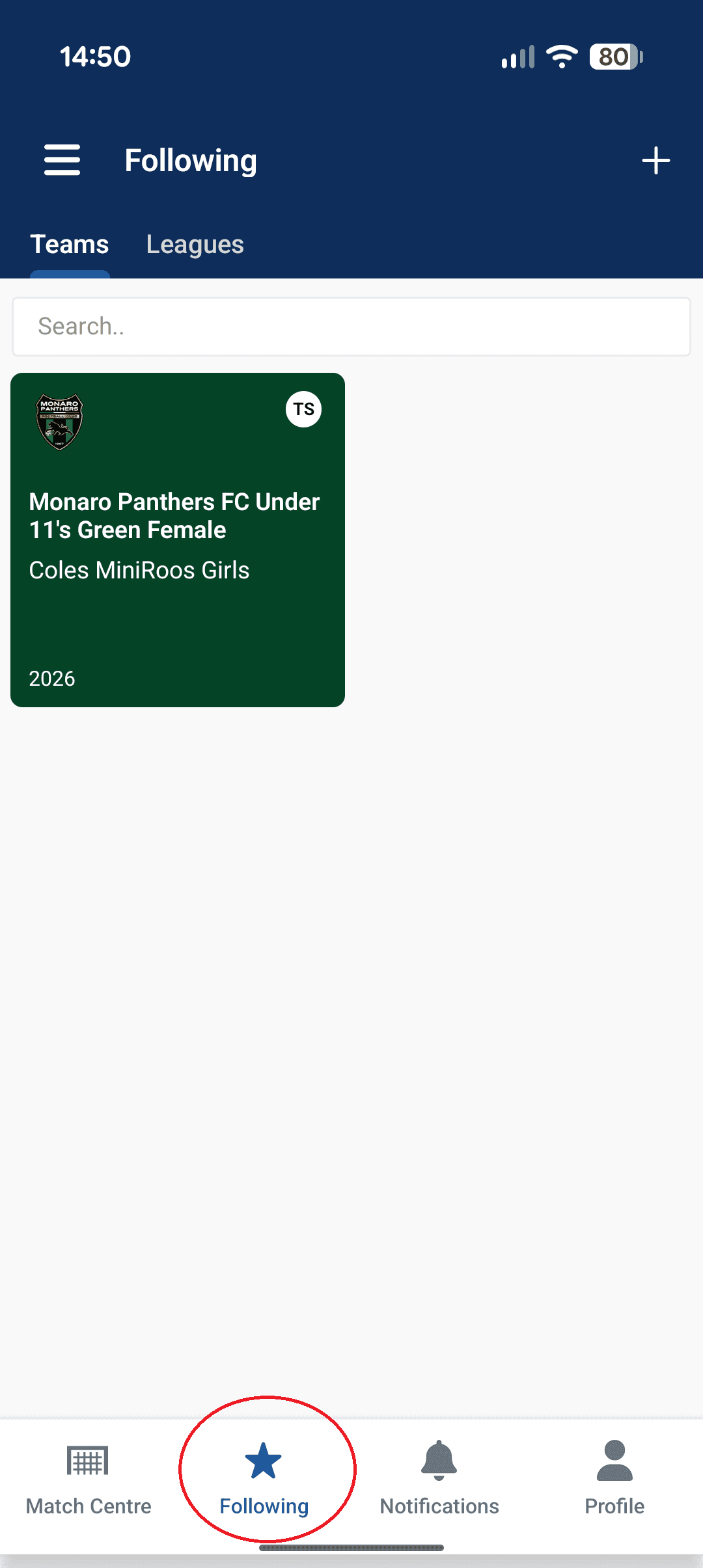
Once you have followed the team, use the Following area to access its match schedule. This includes upcoming fixtures and previous results.
Once you have followed the team, use the Following area to access its match schedule. This includes upcoming fixtures and previous results.
01 OPEN FOLLOWING
Navigate to Following in DRIBL.
Navigate to Following in DRIBL.
02 SELECT YOUR TEAM
Choose the team you previously selected to follow.
Choose the team you previously selected to follow.
03 OPEN MATCHES
Select Matches to see upcoming fixtures as well as previous results.
Select Matches to see upcoming fixtures as well as previous results.
VIEW YOUR TEAM’S MATCHES — IN THE APP
VIEW YOUR TEAM’S MATCHES — IN THE APP
STEP 01
STEP 01
Open Following
Select Following from the DRIBL navigation.
Select Following from the DRIBL navigation.

STEP 02
STEP 02
Select your team
Open the Monaro Panthers team you follow.
Open the Monaro Panthers team you follow.

STEP 03
STEP 03
View Match Centre
Use Match Centre to see the team’s fixtures and results.
Use Match Centre to see the team’s fixtures and results.
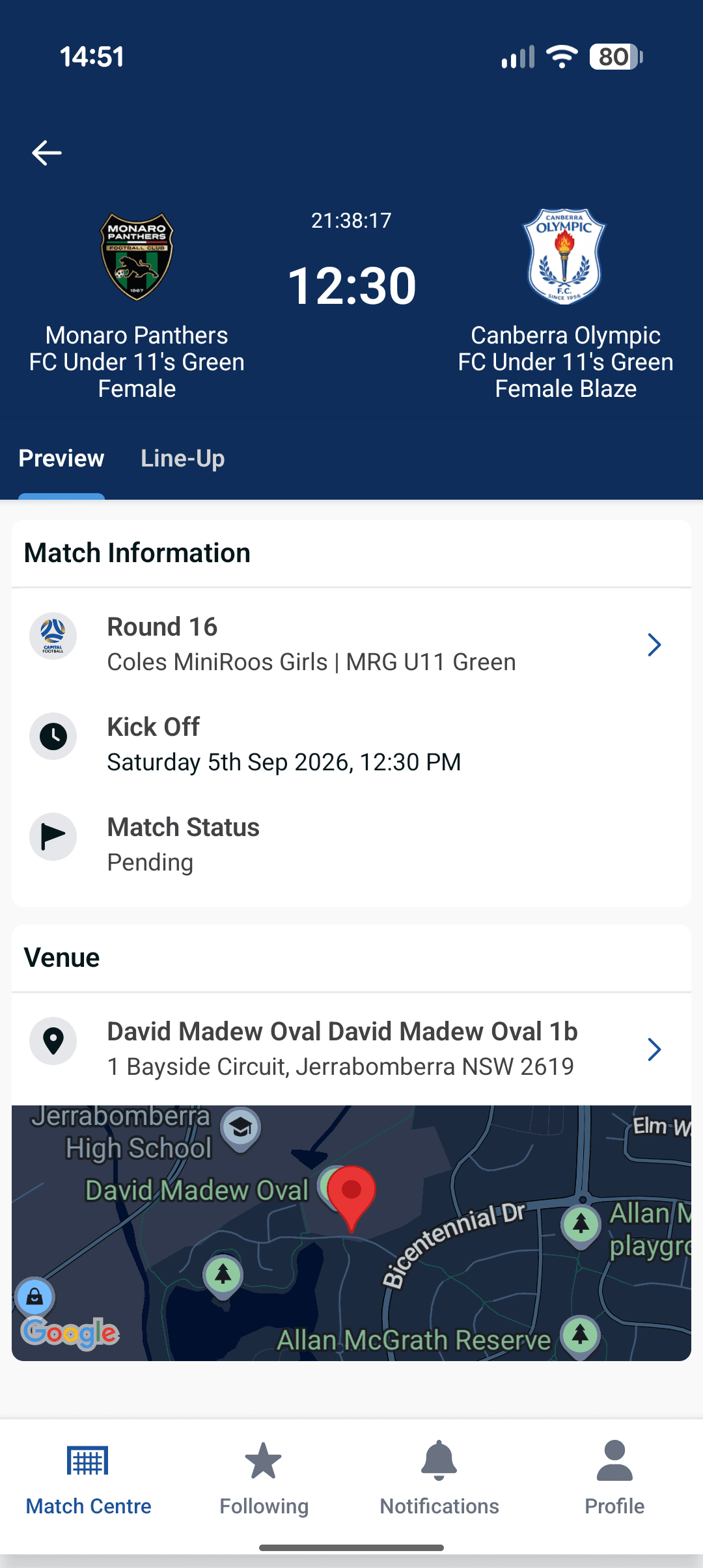
STEP 04
STEP 04
Open the match
Select a match to view its full details and venue.
Select a match to view its full details and venue.
IMPORTANT NOTE
IMPORTANT NOTE
Monaro Panthers uses 360player for team management for events to manage player attendance and availability, starting line-ups and player statistics. 360Player and DRIBL are independent platforms. DRIBL is the official source of truth unless the team manager advises otherwise.
BEFORE MATCH DAY
BEFORE MATCH DAY
Fixture information can change because of scheduling, venue availability, wet weather or other circumstances. Before leaving for a match, check each of the sources below. Direct communication from the club, team manager or coach may sometimes be more current than DRIBL.
Fixture information can change because of scheduling, venue availability, wet weather or other circumstances. Before leaving for a match, check each of the sources below. Direct communication from the club, team manager or coach may sometimes be more current than DRIBL.
MATCH DAY CHECKS
MATCH DAY CHECKS
CHECK ALL THREE SOURCES BEFORE YOU LEAVE
CHECK ALL THREE SOURCES BEFORE YOU LEAVE
01 CHECK DRIBL
01 CHECK DRIBL
Confirm the fixture date, kick-off time, venue, field and opposition.
Confirm the fixture date, kick-off time, venue, field and opposition.
02 CHECK WET WEATHER COMMUNICATIONS
02 CHECK WET WEATHER COMMUNICATIONS
If wet weather may affect the match, review the club or sportsground updates and ground-closure guidance detailed in the wet weather information page.
If wet weather may affect the match, review the club or sportsground updates and ground-closure guidance detailed in the wet weather information page.
WET WEATHER PAGE →
WET WEATHER PAGE →
WET WEATHER PAGE →
03 CHECK 360PLAYER
03 CHECK 360PLAYER
Check for any updates posted by your team manager or coach.
Check for any updates posted by your team manager or coach.
If information differs, follow the latest advice from your team manager, coach or the club.
If information differs, follow the latest advice from your team manager, coach or the club.
TROUBLESHOOTING
TROUBLESHOOTING
CAN’T FIND YOUR TEAM?
CAN’T FIND YOUR TEAM?
Fixtures will only appear once they have been published by the Capital Football competition administrator.
1. Check you selected the correct Capital Football competition.
1. Check you selected the correct Capital Football competition.
2. Check the correct age group and division.
2. Check the correct age group and division.
3. Search for Monaro Panthers FC.
3. Search for Monaro Panthers FC.
4. Confirm the official competition name and team name with your coach or team manager.
4. Confirm the official competition name and team name with your coach or team manager.
5. Check again later if Capital Football has not yet published the fixtures.
5. Check again later if Capital Football has not yet published the fixtures.
NEED MORE HELP?
NEED MORE HELP?
DRIBL has a dedicated Participant Help Centre for players, parents, volunteers and supporters who need further assistance using the platform.
DRIBL has a dedicated Participant Help Centre for players, parents, volunteers and supporters who need further assistance using the platform.
VISIT THE PARTICIPANT HELP CENTRE
VISIT THE PARTICIPANT HELP CENTRE
VISIT THE PARTICIPANT HELP CENTRE