FOR PLAYERS & PARENTS
FOR PLAYERS & PARENTS
360PLAYER QUICK GUIDE
360PLAYER QUICK GUIDE
360Player is Monaro Panthers FC’s main platform for team communication, training and match events, availability and club announcements. Here are the key things you need to know.
360Player is Monaro Panthers FC’s main platform for team communication, training and match events, availability and club announcements. Here are the key things you need to know.

ONE CLUB, MANY GROUPS
ONE CLUB, MANY GROUPS
HOW MONARO USES 360PLAYER
HOW MONARO USES 360PLAYER
360Player connects club management, coaches, team managers, players and parents. The information you see depends on the club, team or player profile you currently have selected.
360Player connects club management, coaches, team managers, players and parents. The information you see depends on the club, team or player profile you currently have selected.


01
RESPOND TO EVENT INVITES
RESPOND TO EVENT INVITES
Coaches and team managers may use 360Player to confirm your availability for training, matches, meetings and other team events.
Coaches and team managers may use 360Player to confirm your availability for training, matches, meetings and other team events.
1. Open the 360Player app.
1. Open the 360Player app.
2. Tap the notification, or open Calendar and select the event.
2. Tap the notification, or open Calendar and select the event.
3. Check the date, time, location and event details.
3. Check the date, time, location and event details.
4. Select Accept if you can attend or Decline if you cannot.
4. Select Accept if you can attend or Decline if you cannot.
5. Add a short comment if needed.
5. Add a short comment if needed.
IMPORTANT NOTE
Please respond to events as soon as practical. Coaches and team managers rely on prompt attendance responses to plan for matches or training sessions.
02
SEND A CHAT MESSAGE
SEND A CHAT MESSAGE
Use Chat when you need to communicate directly with a coach, team manager or another person in your team.
Use Chat when you need to communicate directly with a coach, team manager or another person in your team.
1. Open Chat from the 360Player menu.
1. Open Chat from the 360Player menu.
2. For team group chat, select the existing team group chat, type your message and tap Send.
2. For team group chat, select the existing team group chat, type your message and tap Send.
3. To send a private chat, select New Chat.
3. To send a private chat, select New Chat.
4. Search for and select the person you want to contact.
4. Search for and select the person you want to contact.
5. Type your message and tap Send.
5. Type your message and tap Send.
You can also create group chats and attach files or images where appropriate. Use Chat for conversations or questions; whole-team information will normally appear on the Team Wall.
You can also create group chats and attach files or images where appropriate. Use Chat for conversations or questions; whole-team information will normally appear on the Team Wall.
PRIVATE CHAT NOTE
PRIVATE CHAT NOTE
To send someone a private chat message, you must both be members of a common team group.
To send someone a private chat message, you must both be members of a common team group.
03
ACCESS THE CLUB LOBBY
ACCESS THE CLUB LOBBY
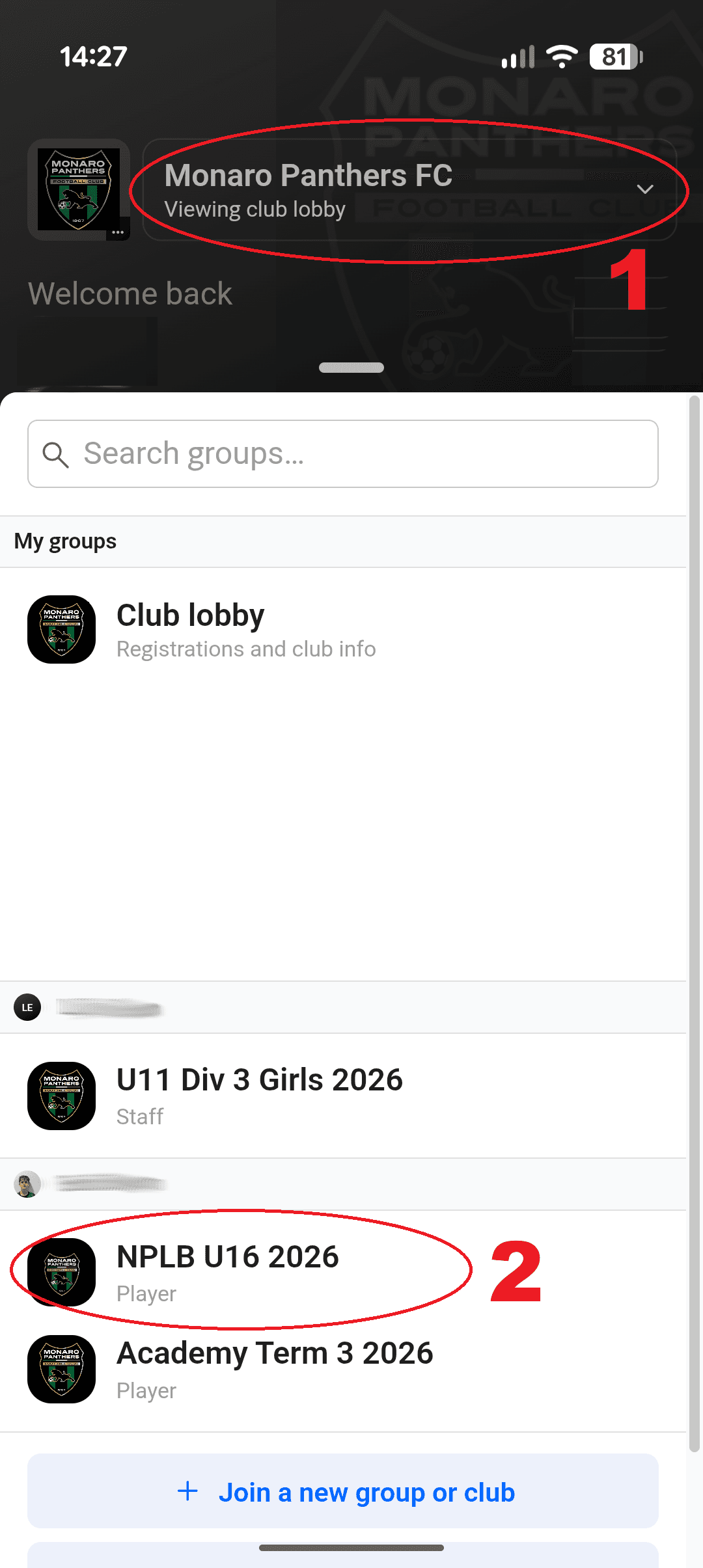
The Club Lobby is where Monaro Panthers communicates information that applies across the whole club. Open the group switcher, select Monaro Panthers FC instead of your individual team, then open Home/Wall.
The Club Lobby is where Monaro Panthers communicates information that applies across the whole club. Open the group switcher, select Monaro Panthers FC instead of your individual team, then open Home/Wall.
WET WEATHER UPDATES • REGISTRATIONS • CLUB EVENTS • ANNOUNCEMENTS • IMPORTANT NOTICES
WET WEATHER UPDATES • REGISTRATIONS • CLUB EVENTS • ANNOUNCEMENTS • IMPORTANT NOTICES


04
ACCESS YOUR TEAM WALL
ACCESS YOUR TEAM WALL
Each Monaro Panthers team has its own Wall for information from your coach and team manager. Open the group switcher at the top, select your team, open Home, then view the latest Wall posts or select View All.
Each Monaro Panthers team has its own Wall for information from your coach and team manager. Open the group switcher at the top, select your team, open Home, then view the latest Wall posts or select View All.
TEAM-SPECIFIC INFORMATION
TEAM-SPECIFIC INFORMATION
Depending on the post, you may be able to Like or Comment. Check the Team Wall for team announcements, schedule details and important updates from your coach or team manager.
Depending on the post, you may be able to Like or Comment. Check the Team Wall for team announcements, schedule details and important updates from your coach or team manager.
KNOW WHERE YOU ARE IN the APP
KNOW WHERE YOU ARE IN the APP
CHECK THE SELECTED GROUP OR PROFILE
CHECK THE SELECTED GROUP OR PROFILE
The information you see depends on which group you currently have selected. If you cannot find something, check the selected club, team or player profile.
The information you see depends on which group you currently have selected. If you cannot find something, check the selected club, team or player profile.
MONARO PANTHERS FC
MONARO PANTHERS FC
Club-wide information → Club Lobby
Club-wide information → Club Lobby
YOUR TEAM
YOUR TEAM
Team information → Team Wall
Team information → Team Wall
THE GOLDEN RULE
THE GOLDEN RULE
KEEP YOUR 360PLAYER NOTIFICATIONS TURNED ON
KEEP YOUR 360PLAYER NOTIFICATIONS TURNED ON
Monaro Panthers, your coach and your team manager may use 360Player to communicate important information throughout the season. When you receive an event invitation, respond promptly so your team knows whether you will be attending.
Monaro Panthers, your coach and your team manager may use 360Player to communicate important information throughout the season. When you receive an event invitation, respond promptly so your team knows whether you will be attending.
NEED MORE HELP?
NEED MORE HELP?
360Player has a dedicated help guide for parents and players who need further assistance using the platform.
360Player has a dedicated help guide for parents and players who need further assistance using the platform.
VISIT THE PARENT & PLAYER HELP GUIDE
VISIT THE PARENT & PLAYER HELP GUIDE
VISIT THE PARENT & PLAYER HELP GUIDE